
GETAWAY GUIDE
How to build a smart trip itinerary
From 1-tap AI day generation and conversational chatbot suggestions to custom places, notes, and checklists, create a stress-free daily schedule.
STEP 1
Get oriented with the Itinerary Canvas
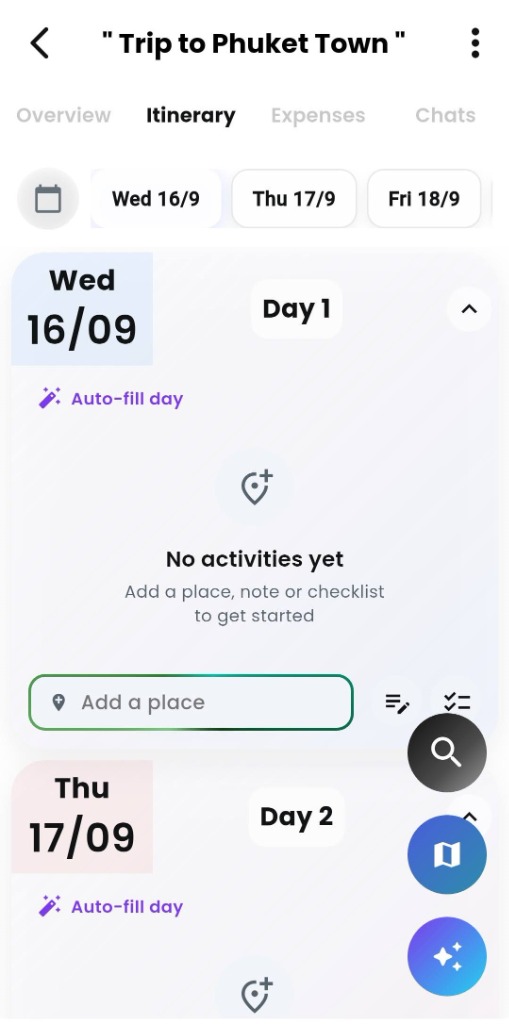
Once you’ve created a trip in Getaway, open it and tap the Itinerary tab (located between Overview and Expenses). Rather than locking you into a rigid schedule or a blank spreadsheet, Getaway gives you an intuitive day-by-day canvas designed for instant flexibility.
Horizontal date selector
Tap any date along the top strip (e.g. Wed 16/9, Thu 17/9) to jump straight to that day’s schedule without endless scrolling.
Day-by-day card blocks
Each day has its own dedicated card with color-coded date tags (Day 1, Day 2) and an expand/collapse toggle (^) to keep multi-day trips clean and organized.
1-Tap “Auto-fill day”
Found at the top of every day card, the 🪄 Auto-fill day magic wand populates top attractions, timing, and travel route order with a single tap.
Bottom day action bar
Quickly search and pin specific spots via 📍 Add a place, or tap the adjacent icons to attach daily notes or pack checklists for that exact day.
Floating action tools (FABs)
Quickly access the global place search (🔍), toggle the route map view (🗺️), or launch the conversational AI Itinerary Chatbot (✨) anytime.
Real-time group collaboration
Any activity, route order update, or note added to the itinerary updates live for all invited travelers and co-hosts on their own devices.
METHOD 1
1-Tap “Auto-fill day” (AI Refill)
Starting with an empty day and don’t know where to begin? Getaway’s Auto-fill day feature instantly builds a balanced, route-optimized daily schedule using curated top attractions, opening hours, and real travel distances.
- Tap Auto-fill Day
- Select Travel Pace
- Generate Picks
- Reorder or Swap Stops
- Add to Timeline
Smart travel pace presets
Choose between Relaxed (3 places), Balanced (5 places), or Packed (7 places) to tailor the daily density to your group’s energy.
Geographic route optimization
Places are chosen close to each other in logical transit order, ensuring your crew never backtracks across town or repeats a spot already on your trip.
Integrated dining stops
Toggle Include lunch & dinner stops to automatically insert highly rated restaurants and cafes that are verified open along your route.
In-sheet reordering & swapping
Before adding to your schedule, easily drag to reorder stops, tap ⇄ to swap an attraction for an alternative, or tap ✕ to remove it.
Automatic inter-stop travel times
Every stop in your timeline displays exact walking and driving travel estimates (e.g. 🚶 4 min · 🚗 310 m / < 1 min) with a 1-tap Direction button.
Instant undo & route re-optimization
Changed your mind? Use the instant Undo banner, or tap 〰️ Optimize route anytime you add new activities to re-sequence the day.
METHOD 2
Itinerary AI Chatbot (Conversational Discovery)
When you have specific trip desires—such as finding secluded beaches, scouting sunset viewpoints, or balancing sightseeing with downtime—the AI Itinerary Chatbot acts as your on-demand travel co-pilot. Chat in plain English, preview recommendations on the interactive map, and command the bot to auto-schedule your day in a single tap.
- Tap Sparkle FAB (✨)
- Ask in Natural Language
- Inspect Map & Reviews
- Refine Vibe or Density
- 1-Tap Add to Day
Natural language trip discovery
Ask open-ended questions like “Suggest best beaches in Phuket. Tell me about Phi Phi island as well” to receive curated, expert destination breakdowns.
Interactive place cards & map view
Tap any highlighted place name in the chat to open a rich modal with photos, Google star ratings, exact addresses, and instant map pins.
1-Tap follow-up prompt pills
Easily tweak suggestions using built-in shortcuts like Make it more relaxed, Add more food stops, or What’s good for nightlife? without retyping.
1-Tap bulk day scheduling
Tap Add places to a day to immediately transform conversational recommendations into an organized daily timeline on your selected date.
Automated transit & travel times
Scheduled activities automatically calculate walking and driving distances between each stop (e.g. 🚶 45 min · 🚗 3.8 km / 6 min) with a 1-tap Direction button.
Seamless group access
Chat responses and scheduled activities are saved directly to your shared trip, keeping co-hosts and travelers on the same page.
METHOD 3
Custom day crafting: Places, checklists & notes
For days when you have specific reservations, favorite cafes, or special packing requirements, Getaway gives you full manual control. Use the bottom action bar on any day card to search and pin custom spots, attach essential notes, and build day-specific gear checklists.
- Select Day on Canvas
- Search & Pin Places
- Auto-Calculate Transit
- Add Day Checklist
- Attach Notes & Tips
Search & pin verified spots
Tap 📍 Add a place in the day action bar to search global locations, shopping malls, restaurants, or viewpoints with instant photo previews and ratings.
Automatic transit between stops
As you add spots to your timeline, Getaway automatically computes walking and driving times (e.g. 🚶 33 min · 🚗 2.7 km / 4 min) with a 1-tap Direction button.
Day-specific gear checklists
Tap the checklist icon (✓≡) to create lists like “Things to carry” with items like umbrellas, water bottles, or cards—pinned directly to that day with interactive check-off circles.
Smart packing suggestions
Tap 💡 Suggestions inside the checklist creator to quickly populate recommended items tailored to activities like shopping, beach trips, or hiking.
Pinned daily reminders & notes
Tap the note icon (≡✏) to write down dress codes, reservation reference numbers, Wi-Fi codes, or meet-up points directly in the daily timeline.
Live group collaboration
Every place, checklist check-off, and note syncs instantly for all trip companions, so everyone knows what to pack and where to go without messaging the host.
THE PRO WORKFLOW
The power combo: Combine AI with custom touches
The secret to effortless travel planning isn’t choosing between pure AI automation or tedious manual planning. Experienced trip organizers combine all three Getaway tools into a fast, 3-phase workflow that takes a trip from a blank calendar to an actionable plan in under five minutes.
1-Tap Auto-fill
- Draft the foundation: Populate blank days with curated attractions in 3 seconds.
- Set the energy: Pick Relaxed, Balanced, or Packed to suit your group’s pace.
- Eliminate blank canvas: Never start a daily schedule from scratch again.
Chatbot Vibe Tuning
- Conversational search: Ask for sunset viewpoints, kids’ activities, or local dishes.
- One-tap refinement: Use follow-up pills to adjust density or discover nearby islands.
- Bulk or single add: Schedule entire chat recommendations or pin single favorites.
Custom Polish
- Pin specific places: Add pre-booked restaurants, tour meeting depots, and villas.
- Day-wise packing lists: Set checklists for temple days, beach days, or night markets.
- Key operational notes: Pin gate codes, ticket confirmation numbers, and dress codes.
Your itinerary check
- Trip dates and day-by-day canvas cards are configured.
- Days are auto-filled or populated with route-optimized attractions.
- Transit travel times and directions between consecutive stops are verified.
- Day-specific gear checklists (swimwear, power banks, temple attire) are in place.
- Key operational notes (dress codes, ticket references, meetup points) are pinned.
- Co-hosts and invited group members have live access on their mobile devices.
Common questions
Can invited travelers and co-hosts edit the itinerary?
Yes. Co-hosts have full editing permissions to add, remove, and reorder activities. Invited guests can view the live timeline, check off checklist items, and suggest spots in the group chat.
Will “Optimize route” alter my fixed-time reservations?
No. When you set specific arrival times for a booking or tour, Getaway locks those time slots and optimizes transit routes around your fixed commitments.
Does the itinerary work offline during the trip?
Yes. Once loaded, your scheduled days, pinned notes, and daily checklists remain cached locally on your device so you can access addresses and packing lists even without roaming data.
Where can I learn more about managing group logistics and shared costs?
Explore our companion guides on Planning a group trip and Tracking and splitting group expenses.